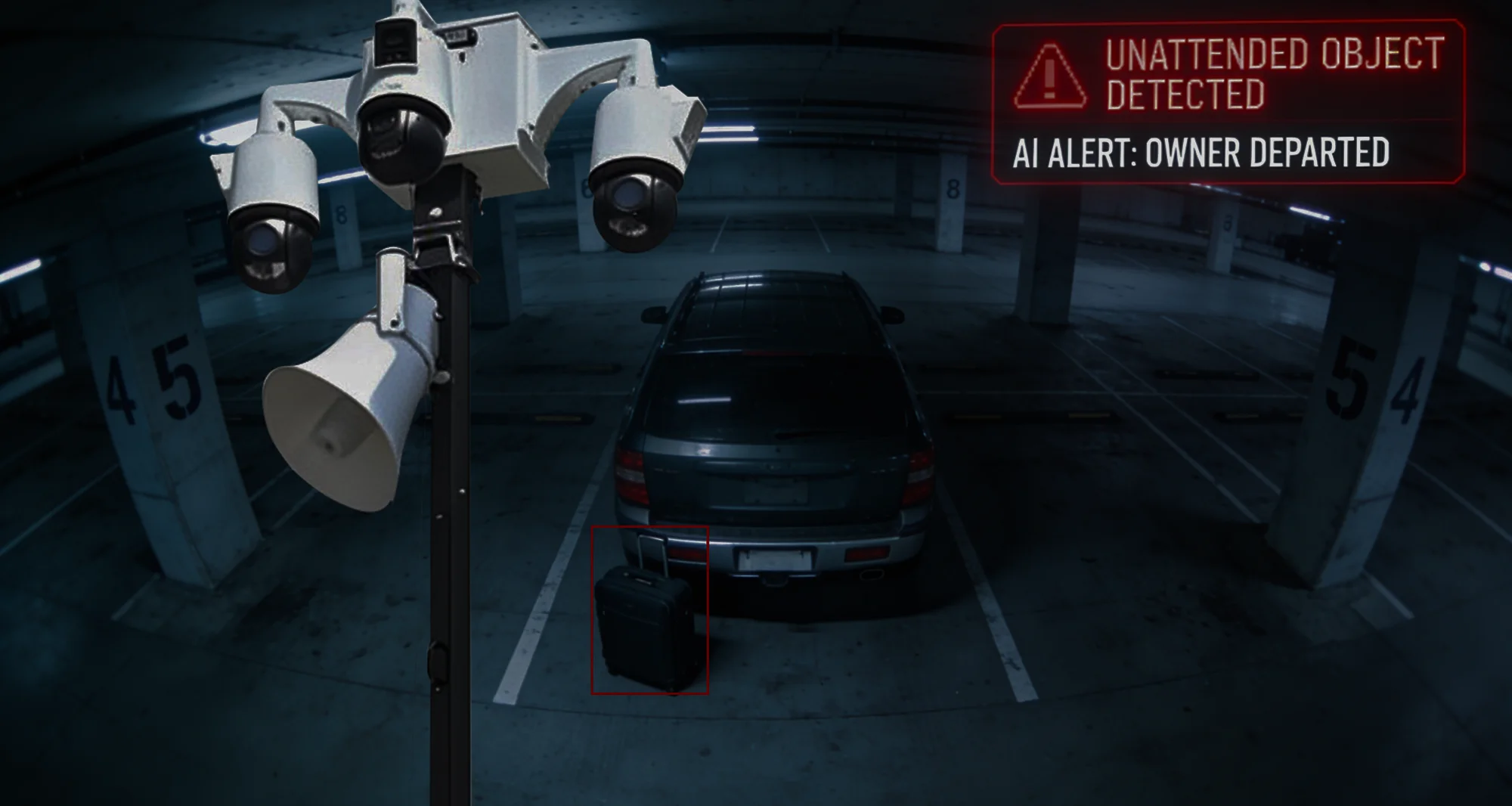
Unattended Object Detection gives your Duck View Systems mobile surveillance unit the ability to flag objects that appear and remain in an area without accompanying movement. Whether on a construction site, dealership, transit station, or public walkway, the system highlights items that shouldn’t be there and alerts your team when something is left behind.
Instead of relying on someone noticing later, the unit captures the moment objects appear, remain, and pose potential risk.
What Is Unattended Object Detection?
Unattended Object Detection is an AI-driven feature built into the Duck View Systems mobile surveillance trailer that identifies items placed in a monitored zone and left without associated activity. The system analyzes patterns to determine whether the object belongs, whether someone is interacting with it, or whether it has been abandoned.
The unit distinguishes normal site materials from newly introduced items, reducing false alerts and improving on-site awareness.
Identifies objects that appear and remain stationary in defined zones
Distinguishes newly introduced items from static background objects
Flags items left without a person nearby
Sends immediate alerts when unattended items meet threshold conditions
Captures images, clips, and metadata for review
Supports Duck View Systems mobile surveillance trailers and fixed cameras
Works across entrances, walkways, high-traffic areas, and equipment zones
Why Unattended Object Detection Matters
Left-behind items can create safety risks, operational slowdowns, or potential threats. Detecting unattended objects early helps operators focus on hazards that matter, without manually watching every camera feed.
Unattended Object Detection helps you:
Identify Suspicious or Out-of-Place Items
Spot bags, tools, boxes, or equipment left in areas where they shouldn’t be.
Reduce Hazards and Liability
Objects left in walkways or high-traffic paths can create tripping hazards or operational delays.
Improve After-Hours Awareness
Items appearing or remaining after hours may signal unusual activity.
Support Investigations and Documentation
Every detection is logged with clips, timestamps, and object details for follow-up.
Enhance Proactive Monitoring
The unit catches items that often go unnoticed during busy operations or unstaffed hours.
Operators outline areas where unattended items pose risk—such as walkways, entrances, storage routes, lobby areas, or equipment paths. These zones tell the system exactly where to watch for misplaced or abandoned objects.
2. AI Detects Newly Introduced Objects
As your Duck View Systems unit streams live footage, the AI analyzes scene changes and identifies when a new object appears within the defined zone—whether it’s a bag, tool, box, or other item.
3. Context Awareness Filters Out Normal Activity
Before marking an item as unattended, the system evaluates context. It checks whether someone is standing near the object, interacting with it, or if it’s part of the site’s normal background layout—reducing unnecessary alerts.
4. Dwell Time Thresholds Trigger Alerts
If the object remains in the same position for longer than your configured duration (e.g., 30 seconds, 2 minutes, 10 minutes), the unit flags it as unattended and sends an alert.
5. Evidence Logging and Review
Each detection is automatically documented with snapshots, timestamps, zone details, and metadata. Operators can review the object’s appearance, track its dwell time, export logs, or include the event in case reports.
This makes documentation and investigations far more accurate.
Want your unit to notify you the moment something is left behind?
Monitor stations, walkways, bus stops, or public events for abandoned objects.
Technical Highlights of Unattended
Object Detection
Item Detection: Identifies stationary, left-behind objects in monitored zones.
Context Analysis: Distinguishes unattended items from items accompanied by nearby people.
Dwell Timing: Adjustable thresholds for detection duration.
Alert Delivery: Real-time notifications with clips, images, and metadata.
False-Alert Reduction: Filters out background objects and routine movement.
Automated Response: Supports visual and audio deterrents when configured.
Deployment: Works on Duck View Systems mobile trailers and fixed-camera installations.
Connectivity: Designed for LTE-connected, remote, and off-grid locations.
Is Your Site Monitoring Catching Items Left Behind Before They Cause Issues?
Unattended Object Detection highlights objects that don’t belong, helping your Duck View Systems unit provide real-time awareness across your site. Identify abandoned items early. Reduce risk. Simplify investigations.
Connect with our team to explore deployment options.
Frequently Asked Questions About Unattended Object Detection
What triggers an unattended object alert?
A new item appearing and remaining stationary within a defined zone for a set duration.
Can it distinguish normal equipment from suspicious items?
Yes. AI identifies whether the item is accompanied by a person or part of the static background.
Can dwell time be customized?
Yes. Operators can choose how long an object must remain before the alert triggers.
Does it work with multiple Duck View Systems units?
Yes. All units and cameras feeding the platform can detect unattended objects.
Does it work at night?
Yes. The feature supports IR and low-light imaging.
Prevent Hazards Before They Disrupt Your Operations With Unattended Object Detection
Left-behind objects often signal risk—whether it’s a tool blocking a path, a suspicious bag, or a misplaced item in a high-traffic zone. With Unattended Object Detection, your Duck View Systems unit highlights these issues early, giving your team time to intervene before they escalate.
It spots what doesn’t belong, flags what gets left behind, and gives your team time to respond before it becomes a bigger problem.