Automated Case Reporting: Turn Video Into Verified Evidence
Turn Incidents Into Actionable Reports Instantly With Case Reporting
Live video. Precise metadata. Ready-to-share reports.
Case Reporting With Automated, Audit-Ready Incident Documentation
Duck View Systems’ Case Reporting feature is built directly into the full mobile surveillance unit, turning raw video into professional, time-stamped incident reports automatically.
No more stitching screenshots or assembling timelines. The system captures, packages, and documents every detail while the incident is happening.
What Is Case Reporting?
Case Reporting is an AI-powered incident reporting workflow built into the Duck View Systems’ mobile surveillance trailer. Each event is detected, captured, and converted into a shareable report with time-coded clips, metadata, and human-readable context.
Instead of fragmented files or spreadsheets, Case Reporting centralizes every incident into one searchable, fully documented archive, ideal for faster investigations and site-wide accountability.
What Case Reporting Does
- Automatically logs incidents with video, audio, and metadata
- Generates timestamped chain-of-custody records
- Includes object, vehicle, face, and plate context via integrated AI features
- Exports quickly to PDF or cloud links for insurers or law enforcement
- Works across multi-site deployments and all Duck View Systems’ surveillance trailers
- Speeds up investigations, compliance reviews, and claim processing

Benefits of the Case Reporting Feature
Case Reporting feature transforms raw surveillance into structured intelligence. By pairing AI detection with automated incident reports, your team stays prepared, compliant, and protected, with less effort and far fewer delays.
The Case Reporting feature stands out because it delivers:
Automated AI Incident Logging
Every alert or anomaly triggers an immediate case file creation.
Complete Video & Metadata Capture
People, vehicles, plates, objects, zones, timestamps — all automatically included.
Chain-of-Custody Integrity
Tamper-proof logs that document every action from detection to closure.
Export-Ready Incident Reports
Ideal for insurance claims, compliance oversight, and law enforcement.
Multi-Site & Mobile-Ready
Supports everything from a single trailer deployment to enterprise-level operations.
Reduced Administrative Burden
Replaces manual note-taking and hours of video review.
Faster Investigation Turnaround
Allows teams to get answers in minutes, not hours.
Experience Intelligent Case Reporting With Full Evidence Trails
Trusted Across Multiple Industries
Construction projects, industrial facilities, retail sites, automotive lots, and municipal agencies rely on Case Reporting for audit-ready documentation and compliance accuracy.
When accountability matters, Case Reporting delivers the proof instantly.
How Case Reporting Works
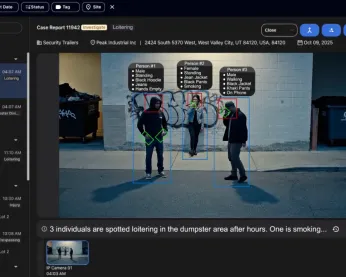
Case Reporting converts raw footage into structured, ready-to-share reports using an automated case-reporting workflow that eliminates manual review and reduces errors.
1. Automatic Event Detection
AI identifies activity such as intrusion, loitering, object removal, unsafe behavior, and more.

2. Capture & Context
Video, metadata, classification tags, and operator notes are attached to the case file.

3. Report Generation
A complete case packet is compiled with:
- Video clips
- Snapshot thumbnails
- Timestamps
- Chain-of-custody logs
- Metadata
- File verified incident reports
4. Review, Share & Archive
Reports appear instantly in your dashboard and can be exported with one click.
3. Report Generation
A complete case packet is compiled with:
- Video clips
- Snapshot thumbnails
- Timestamps
- Chain-of-custody logs
- Metadata
- File verified incident reports
Case Reporting Workflow
1
Detect
2
Capture
3
Compile
4
Review
5
Archive
The entire workflow runs automatically inside the platform, eliminating manual effort and reducing errors.

Technical Highlights
- Automated incident logging with AI
- Time-coded video & snapshots
- Chain-of-custody tracking
- Metadata-rich case packets
- Multi-site reporting dashboard
- One-click PDF exports
- LTE-powered integration with Duck View Systems’ trailers
Looking for expert guidance on smarter mobile monitoring?
We’re here to guide you to the right solution.
Case Reporting Integrates with our other Features:
Natural Language Search / Virtual Guard / Sentry Mode / Focus Mode / AI Patrol
Advanced AI Features That Power Case Reporting
These AI tools enhance Case Reporting by adding stronger compliance oversight, tamper-proof documentation, and automated project tracking.
1
AI Investigator
Delivers advanced forensic search using natural-language queries, allowing teams to locate specific events, people, or vehicles instantly - even across large, high-traffic job sites.
2
AI Safety Compliance
Automatically documents safety-related events, PPE usage, restricted-zone access, and compliance violations with full metadata and time-coded video. Ideal for regulatory reporting and workplace safety oversight.
3
AI Compliance Tracker
Provides a real-time dashboard that monitors safety behavior, PPE adherence, access patterns, and recurring violations. Helps supervisors measure compliance trends, identify risks, and maintain site-wide accountability.
Why Case Reporting Outperforms Traditional Incident Logs
Traditional logs rely on human entry and unstructured video files. Case Reporting automates and centralizes the entire chain of events.
Traditional Incident Logs
- Manual documentation
- Separate apps for notes and video
- Hard to search or verify
- Prone to gaps and omissions
- Slow for urgent cases
Case Reporting
- Automated logs
- Unified video + metadata + notes
- Searchable case archives
- Built-in chain-of-custody
- Near-instant retrieval
Case Reporting vs Traditional Logs
Feature
Log Speed
Searchability
Audit Trail
Multi-site Support
Exports
Case Reporting
Immediate
High (AI-tagged)
Built-in
Yes
One-click
Traditional Logs
Manual delays
Low
Limited
Often no
Manual assembly
Cost Savings & ROI
- Reduce administrative hours by 60–80%
- Accelerate incident resolution
- Improve claims and compliance accuracy
- Prevent unverified or undocumented events
- Strengthen organizational oversight

Where Case Reporting Delivers Value
Supporting construction, industrial, retail, and municipal operations across Utah and nearby states.


If You’re Still Manually Building Reports, You’re Falling Behind
Incidents move fast, and manual reporting can’t keep up. Case Reporting ensures your Duck View Systems unit logs video, metadata, and timelines the moment activity starts, giving you complete, verified documentation without the usual scramble.
Reach out to our team to check available offers.
Frequently Asked Questions About Case Reporting
What is Case Reporting?
Case Reporting is an automated incident-documentation feature built into the full Duck View Systems mobile surveillance unit. It compiles video, metadata, and notes into audit-ready reports automatically.
Does it work without Wi-Fi?
Yes. Case Reporting operates through the Duck View Systems cloud platform and uses LTE from the mobile surveillance trailer, so no Wi-Fi or onsite servers are required.
Can it integrate with other AI features?
Yes. Case Reporting works seamlessly with features like Focus Mode, License Plate Recognition (LPR), AI Investigator, and the AI Compliance Tracker.
What types of incidents are supported?
Everything from trespassing and theft to safety violations, object removal, access issues, and equipment movement.
How fast are case reports generated?
Reports are generated automatically, often instantly, as soon as the system detects unusual activity.
Get Complete Incident Clarity With AI-Driven Case Reporting
Don’t wait until paperwork piles up or video goes overlooked. Duck View Systems’ Case Reporting delivers instant, organized, and evidence-ready documentation the moment an incident occurs.
With automated logging, time-coded video, metadata tagging, and export-ready reports, you get complete incident clarity in minutes, not hours.
When accountability matters, AI Case Reporting delivers full transparency.