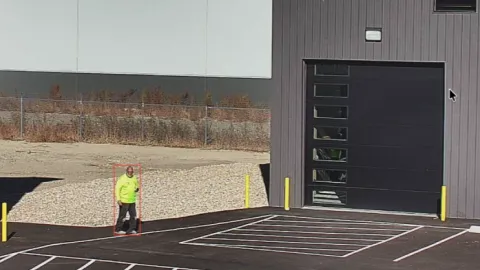
The AI Activity Feed provides a continuous, real-time log of events detected by your Duck View Systems mobile surveillance unit. Each AI-triggered action—motion, loitering, intrusion, PPE issues, line crossing, or entry into restricted areas—is displayed as an organized, time-stamped entry.
Instead of jumping between cameras or alert windows, your unit delivers a unified timeline that shows everything the moment it occurs.
What Is AI Activity Feed?
AI Activity Feed is the central event timeline built into the Duck View Systems mobile surveillance trailer. It compiles alerts from all active AI features and displays them as a clean, chronological stream. Every event includes detailed metadata so operators can act quickly or review incidents without digging through hours of footage.
Whether your unit detects a person crossing a tripwire, lingering near equipment, or approaching a sensitive zone, the Activity Feed logs it instantly.
Displays time, camera ID, event type, and severity level
Shows image or video preview thumbnails
Supports quick filtering by alert type, time, or device
Integrates with Case Reporting for built-in documentation
Enables fast playback or jump-to-live
Works seamlessly with Duck View Systems mobile surveillance trailers
Retains historical logs for audits and incident reviews
Why the AI Activity Feed Matters
When events occur across your site, the Activity Feed keeps everything organized in one place. Instead of scanning multiple windows or guessing what happened first, the feed presents a clean timeline of activity that helps your team understand patterns and react quickly.
The AI Activity Feed helps you:
Stay Aware of Every Event
Real-time entries ensure nothing goes unnoticed, even during unmanned hours.
Prioritize What Matters Most
Sort events by severity or type to focus on high-priority movement first.
Build Accurate Audit Trails
Timestamps, previews, and metadata support insurance reviews, compliance needs, or internal documentation.
Improve Operational Insight
Repeated entries in the same area can highlight potential problem zones.
Simplify Incident
Review
Every entry can link to playback or live view for fast follow-up.
As your Duck View Systems unit monitors the site, any AI-triggered action—movement, loitering, intrusion, PPE detection, tripwire crossing, or zone entry—generates an event automatically.
2. The System Classifies the Event
Each detection is categorized based on the AI feature that triggered it, such as loitering, intrusion, directional line crossing, PPE status, or general motion. This ensures the feed stays organized and easy to review.
3. Event Details Are Logged Securely
Every entry includes essential metadata: timestamp, camera ID, event type, severity tag, and a preview thumbnail. This structure supports fast review as well as long-term documentation.
4. Timeline Updates in Real Time
New events appear instantly in the Activity Feed—no refreshing required—giving operators a live, continuous stream of site activity as it unfolds.
5. Events Can Be Reviewed, Exported, or Escalated
Operators can open each entry, add internal notes, export footage, or convert it directly into a case report through the platform’s built-in reporting tools.
This makes documentation and investigations far more accurate.
Want a system that shows every event in a clear, real-time stream?
Document activity near public pathways, fenced utilities, or multi-building areas.
Technical Highlights of AI Activity Feed
Real-Time Logging: Every event appears the moment it’s detected.
Event Metadata: Timestamp, camera ID, threat tag, and preview image.
Filter Controls: Sort by event type, time, device, or severity.
Playback Integration: Jump from event to live view or captured footage.
Mobile Access: View feed entries from any connected device.
Case Reporting: Convert events into documented reports instantly.
Tamper-Proof Records: Events stored with locked metadata.
Connectivity: Works on LTE-powered Duck View Systems mobile units.
Is Your Current Monitoring System Showing You the Events You Need to See?
AI Activity Feed provides a clear, organized timeline of every captured incident—helping your Duck View Systems unit display what’s happening the moment it happens. Stay informed. Track trends. Review events instantly.
All AI-detected events, including motion, loitering, boundary crossings, and intrusion alerts.
Does it track multiple cameras?
Yes. All cameras on your Duck View Systems trailer appear in the same feed.
Can I filter events?
Yes. You can filter by event type, time, severity, or device.
Can I access the feed from mobile?
Yes. The feed is fully accessible through your connected mobile device.
Does it support incident reporting?
Yes. Each event can be turned into a case report with a single click.
AI Activity Feed: Your Central Command for Smart Protection
AI Activity Feed turns scattered alerts into a clear, continuous timeline your team can follow instantly. Instead of guessing when something happened, or switching between multiple screens, you get a unified stream of real-time entries that reveal patterns, timing, and on-site behavior. Your Duck View Systems unit brings every detail into focus so you can act faster, investigate smarter, and stay aware at all times.
Every alert in one place. Every detail captured. Every moment accounted for.